Is Google Search Live’s Global Expansion About to Change the Way You Find Answers?

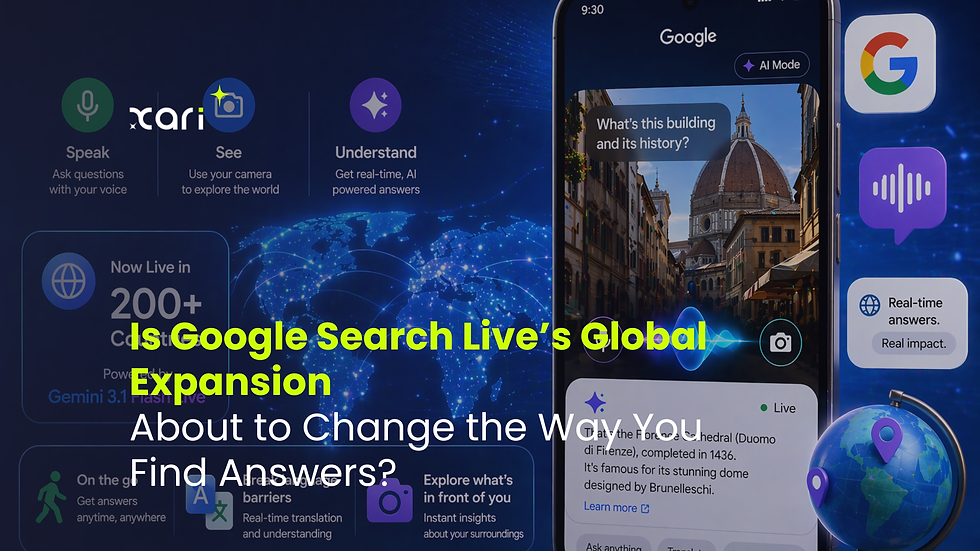
Google Search is stepping boldly into the future with the global rollout of Search Live powered by Gemini 3.1 Flash Live, now accessible in over 200 countries. This wave of innovation lets you ask questions by speaking or using your camera, promising real-time, rich responses—whether you’re on the go, facing a language barrier, or curious about something in sight. In this post, we break down exactly how these voice and camera features work in ‘AI Mode’, highlight what’s new for users and developers, and reflect on how this expansion could reshape how we all search for answers. Ready to see if the way you find information is about to change forever?
Inside the Expansion: What’s New with Google Search Live and Gemini 3.1 Flash Live
The recent international rollout of Google Search Live, driven by Gemini 3.1 Flash Live, is one of the biggest shifts to hit search technology in years. With availability shooting up to over 200 countries almost overnight, Google’s new real-time experience isn’t just for a handful of early adopters—it’s now a true global tool. This marks a pivotal moment: search is no longer just about typing and scrolling, but about asking, showing, and getting immediate, contextual answers in ways we haven’t seen before.
A Closer Look at Gemini 3.1 Flash Live’s Core Features
At the heart of this upgrade is Gemini 3.1 Flash Live, Google’s latest conversational AI. Unlike earlier versions, this AI doesn’t just process keywords: it can understand the nuance of spoken and visual questions, hold a genuine back-and-forth, and tap into live data for up-to-the-minute results. Speed, context, and accuracy are central themes here. Answers come noticeably faster, and the AI remembers previous parts of a conversation, making it easier to ask follow-up questions without repeating yourself.
Google Lens Live: Real-Time Integration Comes of Age
Perhaps even more striking is the way Google Lens Live has been woven into Search Live. Snap a photo or point your camera at something—food, landmarks, gadgets—and the search kicks off instantly, pulling in data relevant to what’s in front of you right now. This isn’t just static image recognition: Lens Live uses Gemini’s understanding to provide richer, context-based answers, whether you need nutritional info on a snack, background on an artwork, or details to help identify an unknown product.
Key Improvements That Matter
Instant search in over 200 countries: No more waiting for phased releases or region-locked trials.
Conversational AI that feels genuinely responsive: Recognizing speech patterns, context, and follow-ups with far better accuracy.
Real-time camera and voice input: Fully integrated, not tacked-on—making search feel natural whether you speak, type, or show.
This global move represents a fundamental leap for Google Search Live. It’s built to feel seamless, whether you’re in a crowded city or off the beaten path—and it sets the stage for a new wave of real-time, conversational, and truly interactive search.
Voice and Camera in AI Mode: How New Search Interactions Work
AI Mode is taking Google Search Live to another level by letting you engage with search through your voice and camera with remarkable ease. Instead of typing queries, you simply tap the microphone or camera icon, speak your question, or show what you want to know more about. Here’s how this new interaction model works, step by step.
How to Use Voice and Camera Search in AI Mode
1. Initiating a Search
Voice: Open Google Search, tap the microphone, and speak your question naturally—no special phrasing needed.
Camera: Tap the camera icon (often branded as Lens Live), then point your camera at objects, text, or scenes that raise questions.
2. Instant, Contextual Responses
Audio: AI Mode parses your speech instantly, returning results verbally, on-screen in text, or both, depending on your device settings.
Visual: If you scan an item, Google interprets not only the image but the context—suggesting related searches, identifying products or landmarks, or translating text right in the viewfinder.
Practical Scenarios
Travel: Unsure what a street sign means abroad? Snap a quick photo and get live translation or local information.
Shopping: See an unfamiliar item in a store—point your camera for instant product details, reviews, or price comparisons.
Everyday Tasks: Reading a menu in another language, identifying plants, or getting a how-to video for a tool you’re holding—all possible without typing a word.
Device Compatibility and User Tips
Widely Supported: Android (latest versions), iOS with updated Google App, and even certain smart glasses or wearables.
Tips for Best Results:
Speak clearly, especially in noisy environments.
Make sure your camera is focused and well-lit for visual queries.
Use the follow-up feature; AI Mode keeps track of your context, making multi-step searches smoother.
Accessibility and Inclusivity
Instant voice and visual technology breaks down accessibility barriers. Users with limited mobility, vision, or reading challenges benefit from hands-free operation and real-time language conversion. Plus, with cross-language support, you can search in multiple languages live—making information more inclusive and usable wherever you are.
AI Mode transforms how you interact with Google Search Live. The search process becomes more conversational, interactive, and, ultimately, human-centered.
Smarter Conversations and Live Results: What’s Changed About Getting Answers
Search isn’t what it used to be—and that’s a good thing. Gone are the days of typing isolated keywords and sifting through static lists of results. Google’s Gemini-powered approach means you can have actual conversations with Search Live, moving beyond one-off queries to continuous, real-time exchanges that adapt to what you need as you go.
Conversations, Not Just Queries
The real breakthrough with Gemini’s conversational capabilities is its context memory. You can start with a broad question—“What’s this gadget?”—and instantly follow up with, “How do I use it?” or “Where can I buy accessories for it?” Without losing track, the AI understands each new layer, pulling in richer info every step of the way.
Key advancements include:
Multi-turn conversations: Build on earlier questions without repeating yourself.
Context-aware answers: Results change as your conversation evolves, offering more tailored guidance.
Live, Context-Driven Results
A big part of this upgrade is Google’s ability to provide responses based on what’s happening around you, right now. Thanks to real-time object recognition, Search Live can:
Quickly identify almost any everyday object or product in your environment.
Pull up how-to guides or troubleshooting steps on the spot.
Suggest nearby stores or online vendors if you’re curious about shopping options.
Everyday Uses You’ll Actually Notice
Quick How-Tos: Point at that unfamiliar tool in your garage and ask, “What is this, and how do I use it?” Search Live guides you—step by step.
Shopping Assistance: Considering a product in-store? Use your camera, get instant reviews, price comparisons, or similar options.
Instant Recognition: Whether it’s a strange ingredient in your kitchen, a new gadget, or even a local plant—just show and ask.
These smarter, context-aware conversations don’t just make search faster—they make it feel like a partnership, helping you solve everyday problems in real time.
Developer Opportunities and Multilingual Reach: Who Benefits and How
The expansion of Google Search Live goes well beyond end-users—developers are seeing new doors open with Gemini 3.1’s robust capabilities. Google’s updated APIs bring advanced voice, camera, and conversational search to countless applications, making it easier to build smarter, more interactive digital experiences on a global scale.
What Developers Gain with Search Live APIs
The new developer toolkit is broad and powerful:
Real-Time Data Access: Tap directly into Search Live’s instant answers and visual recognition, enhancing everything from e-commerce platforms to educational apps.
Conversational AI: Integrate multi-turn, context-aware chat into customer support, virtual assistants, or productivity tools, with accuracy powered by Gemini 3.1.
Visual Input Handling: Build features that let users identify objects, scan text, or translate live—all within your own product interface.
Global Scalability: With launch support in over 200 countries, developers can build once and serve a worldwide audience without custom region-specific builds.
By leveraging these APIs, businesses and tech innovators can offer deeper, faster search experiences—enabling smarter workflows, more natural user interactions, and higher accessibility.
Multilingual Reach: Breaking Digital Language Barriers
One of the flagship hallmarks of this expansion is extensive multilingual support. Search Live now supports queries and answers in dozens of languages, with seamless handling of cross-language interactions:
Voice and Text Multilingualism: Search in your native tongue, get instant translations, or interact across multiple languages without added plugins.
Inclusive by Default: This break from single-language barriers means users from rural regions, expatriates, or non-English-dominant countries all have the same fast access to knowledge.
Empowering Developers: Apps built with the latest APIs can customize or auto-detect language preferences, driving higher engagement and usability for diverse global audiences.
With Gemini 3.1 and Search Live’s infrastructure, developers are empowered to build the next generation of apps—smarter, more accessible, and truly international.
What This Means for the Everyday Searcher—and What’s Still Unknown
As Google Search Live goes mainstream, its new voice and camera-powered approach could genuinely reshape how most people look for answers. Search is moving from something you do at your desk or phone keyboard to an ever-present, real-time assistant—one that listens, sees, and understands the nuance behind every query. This shift may mean less friction, more immediate help, and far broader accessibility for everyone from tech-savvy users to those for whom traditional search was always a little intimidating.
Changing Habits and Everyday Gains
Faster Answers, Lower Barriers: Speaking or showing, instead of typing, speeds up searches and makes them feel natural—even for those less comfortable with written queries.
Seamless Multilingual Experiences: Translation baked right into search stands to open up vast new resources for learners, travelers, and anyone living or working between languages.
On-the-Go Convenience: Using search in crowded, noisy, or unfamiliar environments becomes practical, especially with wearable integrations and offline hints.
Privacy, Limitations, and Challenges
Yet, every step forward comes with new questions:
Privacy and Data Use: As more queries involve voice and camera input, some users may worry about how much data Google stores, shares, or uses to refine results. Google states that privacy remains a focus, but as always with evolving AI, transparency and user control are key topics to monitor.
Device and Connectivity Gaps: Not all smartphones or regions will experience the same fluidity. Older hardware, patchy internet, or limited processing power could result in slower or less accurate experiences compared to premium devices.
Language Nuance and Context: While Gemini 3.1 is set up for multilingual conversations, nuances in slang, dialects, or cultural references can still trip up even the most advanced models. Ongoing improvements are likely, but there’s room for misses—especially in less widely spoken languages.
What’s Still Uncertain—and What Could Come Next
Does real-time visual and voice search scale equally well across all global markets?
Will Google solve the challenge of nuanced, idiomatic understanding in dozens of languages?
How far will third-party integrations and developer tools go in bringing these capabilities outside Google’s own products?
For now, it’s clear the foundation has shifted. Search is becoming a hands-free, voice- and vision-powered helper—one that still has a few big questions to answer as it transforms how we all find information.


Comments